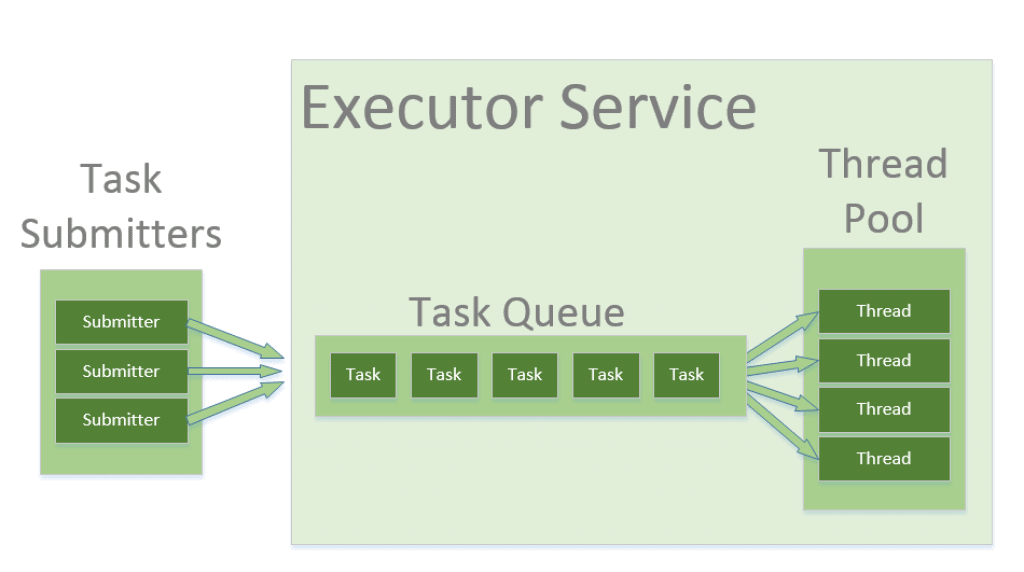
gopool - 字节跳动开源的Golang协程池速览
goroutine做为 golang中的轻量级线程实现,官方并没有提供其池化的实现。当在项目中大量使用 go关键字启动 goroutine时可能会引发一些问题:
- 协程数量过多:虽然
golang官方号称go可以调度百万级goroutine,但是其带来的性能影响和内存占用是不可控的 - 协程泄露:如果协程在执行过程中出现了
bug,导致无法被GC回收,当存在大量goroutine无法被回收时可能导致程序panic
在此基础上,字节跳动开源了其协程池实现,原理类似于 Java的线程池,使用链表来记录待处理的任务信息,同时使用 sync.Pool将对象池化,减少内存分配操作。
Github地址
目录结构
# gopkg/util/gopool

config.go # 参数配置
gopool.go # 入口文件 对外暴露函数
pool.go # 协程池接口和实现
pool_test.go # 单元测试
worker.go # 工作协程
config.go
package gopool

const (
    // 默认阈值
	defaultScalaThreshold = 1
)

// Config is used to config pool.
type Config struct {
	// 启动工作协程的待处理任务阈值
	ScaleThreshold int32
}

// 创建一个默认配置
func NewConfig() *Config {
	c := &Config{
		ScaleThreshold: defaultScalaThreshold,
	}
	return c
}
pool.go
package gopool

import (
	"context"
	"sync"
	"sync/atomic"
)

type Pool interface {
	// 协程池名称
	Name() string
	// 设置工作协程数量限制
	SetCap(cap int32)
	// 提交任务
	Go(f func())
	// 提交任务并传递Context
	CtxGo(ctx context.Context, f func())
	// 设置协程在运行过程中发送panic的处理逻辑 会传递提交任务时的Context和panic信息
	SetPanicHandler(f func(context.Context, interface{}))
	// 返回当前正在运行的工作协程数量
	WorkerCount() int32
}

// 任务对象池
var taskPool sync.Pool

func init() {
	taskPool.New = newTask
}

// 任务链表 用于存储提交任务的Context和函数
type task struct {
	ctx context.Context
	f   func()

	next *task
}

// 清空字段
func (t *task) zero() {
	t.ctx = nil
	t.f = nil
	t.next = nil
}

// 清空字段后将任务放回对象池
func (t *task) Recycle() {
	t.zero()
	taskPool.Put(t)
}

// 创建一个新任务对象
func newTask() interface{} {
	return &task{}
}

// 任务链表 未使用
type taskList struct {
	sync.Mutex
	taskHead *task
	taskTail *task
}

// 协程池实现
type pool struct {
	name string

	cap int32
	// 配置信息
	config *Config
	// 链表的头节点
	taskHead  *task
    // 链表的尾节点
	taskTail  *task
	taskLock  sync.Mutex
	taskCount int32

	// 当前的工作协程数量
	workerCount int32

	// pacnic处理函数
	panicHandler func(context.Context, interface{})
}

// 创建协程池
// name 协程池名称
// cap 工作协程限制数量
// config 配置信息
func NewPool(name string, cap int32, config *Config) Pool {
	p := &pool{
		name:   name,
		cap:    cap,
		config: config,
	}
	return p
}

func (p *pool) Name() string {
	return p.name
}

func (p *pool) SetCap(cap int32) {
	atomic.StoreInt32(&p.cap, cap)
}

// 提交任务 调用CtxGo传递一个空Context
func (p *pool) Go(f func()) {
	p.CtxGo(context.Background(), f)
}

// 提交任务 最终调用的方法
func (p *pool) CtxGo(ctx context.Context, f func()) {
    // 从任务对象池中拿到一个空的任务对象
	t := taskPool.Get().(*task)
    // 设置字段
	t.ctx = ctx
	t.f = f
    // 加锁 开始操作任务链表
	p.taskLock.Lock()
    // 如果链表的头节点为空 就说明当前任务是第一个任务
    // 设置链表的头节点和尾节点都为当前任务
	if p.taskHead == nil {
		p.taskHead = t
		p.taskTail = t
	} else {
        // 如果不为空 就将当前任务设置为链表的尾节点
		p.taskTail.next = t
		p.taskTail = t
	}
	p.taskLock.Unlock()
    // 将待处理的任务数量加1
	atomic.AddInt32(&p.taskCount, 1)
	// 判断当前是否符合启动工作协程的条件
    // 1. 待处理的任务数量大于等于启动工作协程的阈值
    // 2. 当前正在运行的工作协程数量小于工作协程数量限制
    // 如果正在运行的工作协程数量等于0 那么会直接运行
	if (atomic.LoadInt32(&p.taskCount) >= p.config.ScaleThreshold && p.WorkerCount() < atomic.LoadInt32(&p.cap)) || p.WorkerCount() == 0 {
        // 添加工作协程数量
		p.incWorkerCount()
        // 从对象池中拿到工作协程对象
		w := workerPool.Get().(*worker)
		w.pool = p
        // 运行工作协程
		w.run()
	}
}

// SetPanicHandler the func here will be called after the panic has been recovered.
func (p *pool) SetPanicHandler(f func(context.Context, interface{})) {
	p.panicHandler = f
}

func (p *pool) WorkerCount() int32 {
	return atomic.LoadInt32(&p.workerCount)
}

// 添加工作协程数量
func (p *pool) incWorkerCount() {
	atomic.AddInt32(&p.workerCount, 1)
}

// 减少工作协程数量
func (p *pool) decWorkerCount() {
	atomic.AddInt32(&p.workerCount, -1)
}
worker.go
package gopool

import (
	"fmt"
	"runtime/debug"
	"sync"
	"sync/atomic"

	"github.com/bytedance/gopkg/util/logger"
)
// 工作协程对象池
var workerPool sync.Pool

func init() {
	workerPool.New = newWorker
}

type worker struct {
	pool *pool
}

func newWorker() interface{} {
	return &worker{}
}

// 运行方法
func (w *worker) run() {
    // 使用 go 启动一个goroutine
	go func() {
        // 循环执行任务链表中的所有任务
		for {
			var t *task
            // 开始任务链表所
			w.pool.taskLock.Lock()
            // 如果链表中存在任务
            // 那么就取出一个任务并且将链表头往后移一个节点
            // 同时再将协程池中的待处理任务数量减1
			if w.pool.taskHead != nil {
				t = w.pool.taskHead
				w.pool.taskHead = w.pool.taskHead.next
				atomic.AddInt32(&w.pool.taskCount, -1)
			}
            // 如果获取倒的任务为空
            // 说明待处理任务链表中所有的任务都已经被执行
            // 那么就关闭当前工作协程并回收对象并跳出循环
			if t == nil {
				// if there's no task to do, exit
				w.close()
				w.pool.taskLock.Unlock()
				w.Recycle()
				return
			}
			w.pool.taskLock.Unlock()
            // 再启动一个func用于任务执行
            // 如果不启动func 当任务执行出现panic时 会跳出循环并结束当前方法
			func() {
				defer func() {
					if r := recover(); r != nil {
                        // 判断是否设置了panic处理函数 如果设置了就调用
						if w.pool.panicHandler != nil {
							w.pool.panicHandler(t.ctx, r)
						} else {
							msg := fmt.Sprintf("GOPOOL: panic in pool: %s: %v: %s", w.pool.name, r, debug.Stack())
							logger.CtxErrorf(t.ctx, msg)
						}
					}
				}()
                // 执行任务函数
				t.f()
			}()
            // 回收任务对象
			t.Recycle()
		}
	}()
}

// 关闭任务协程 减少协程池中工作线程的数量
func (w *worker) close() {
	w.pool.decWorkerCount()
}

func (w *worker) zero() {
	w.pool = nil
}

func (w *worker) Recycle() {
	w.zero()
	workerPool.Put(w)
}
gopool.go
package gopool

import (
	"context"
	"fmt"
	"math"
	"sync"
)

// 默认协程池
var defaultPool Pool

// 协程池缓存
var poolMap sync.Map

func init() {
	defaultPool = NewPool("gopool.DefaultPool", math.MaxInt32, NewConfig())
}

// 对外暴露的函数 使用默认的协程池执行
func Go(f func()) {
	CtxGo(context.Background(), f)
}

func CtxGo(ctx context.Context, f func()) {
	defaultPool.CtxGo(ctx, f)
}

// 设置默认协程池的工作协程数量限制
func SetCap(cap int32) {
	defaultPool.SetCap(cap)
}

// 设置默认协程池的panic处理函数
func SetPanicHandler(f func(context.Context, interface{})) {
	defaultPool.SetPanicHandler(f)
}

// 获取默认协程池正在运行的工作协程数量
func WorkerCount() int32 {
	return defaultPool.WorkerCount()
}

// 注册自定义的协程池,将协程池放到 poolMap 缓存中
// 如果协程池的name相同 那么会被覆盖
func RegisterPool(p Pool) error {
	_, loaded := poolMap.LoadOrStore(p.Name(), p)
	if loaded {
		return fmt.Errorf("name: %s already registered", p.Name())
	}
	return nil
}

// 通过协程池名称获取协程池 不存在返回nil
func GetPool(name string) Pool {
	p, ok := poolMap.Load(name)
	if !ok {
		return nil
	}
	return p.(Pool)
}



0 条评论